# 破冰對話

選取破冰對話

<figure><img src="/files/FIvE7Vo3KMGsBOnl25hN" alt=""><figcaption></figcaption></figure>

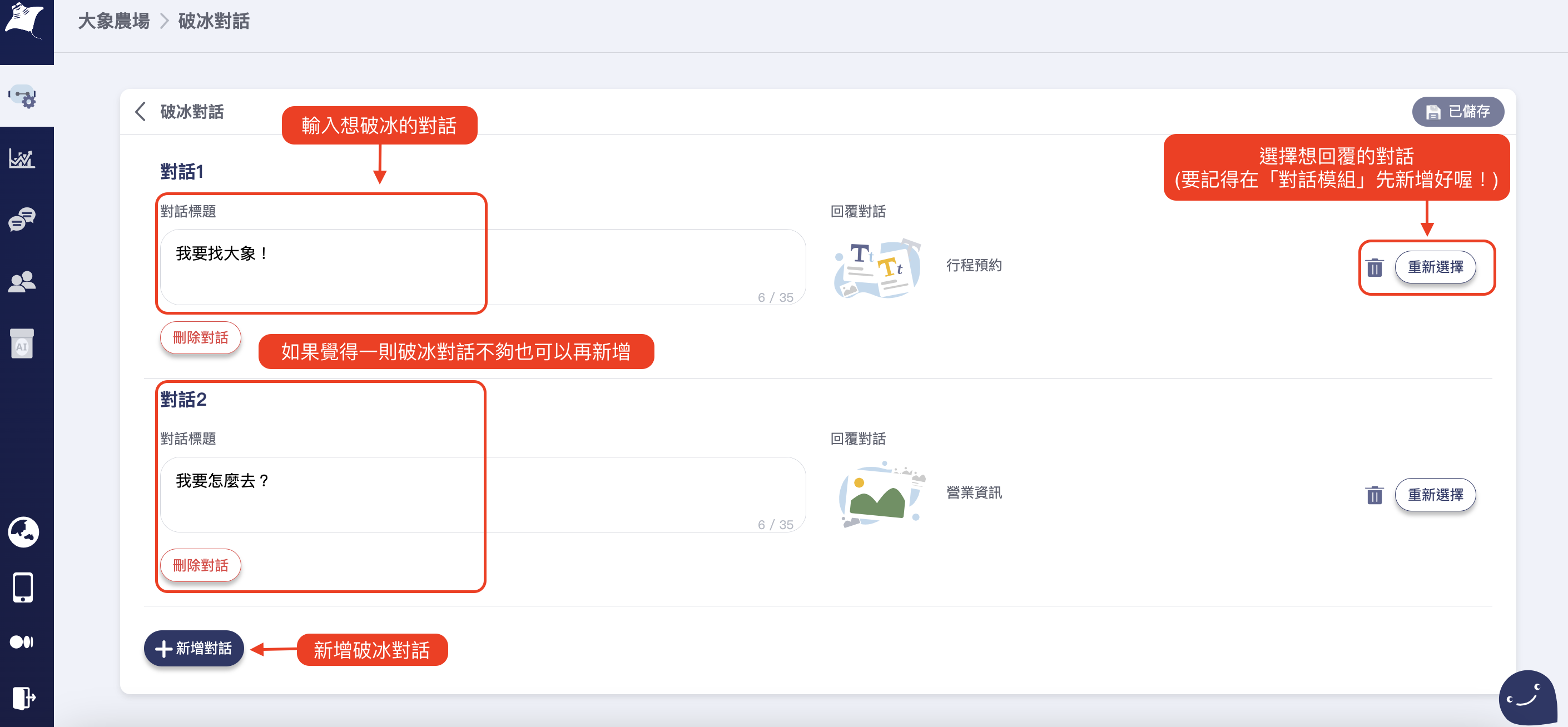
在對話筐中輸入想破冰的對話，並選擇對話模組

<figure><img src="/files/wXB1FSam7rXBehJtMrkU" alt=""><figcaption></figcaption></figure>

設定完成後在綁定的臉書粉專就可以看到剛才設定破冰對話啦！點擊按鈕後就會出現設定時所回覆的「對話模組」 囉！

<div><figure><img src="/files/EiFjVXZy3UlUr0NGUbvH" alt=""><figcaption></figcaption></figure> <figure><img src="/files/wz2aKWLpxZMO2L96e6ee" alt=""><figcaption></figcaption></figure></div>


---

# Agent Instructions: Querying This Documentation

If you need additional information that is not directly available in this page, you can query the documentation dynamically by asking a question.

Perform an HTTP GET request on the current page URL with the `ask` query parameter:

```
GET https://blog.mantago.cc/zh/gong-neng-xuan-dan/po-bing-dui-hua.md?ask=<question>
```

The question should be specific, self-contained, and written in natural language.
The response will contain a direct answer to the question and relevant excerpts and sources from the documentation.

Use this mechanism when the answer is not explicitly present in the current page, you need clarification or additional context, or you want to retrieve related documentation sections.